> ## Documentation Index
> Fetch the complete documentation index at: https://docs-dev-fix-supported-algorithms.mintlify.site/llms.txt
> Use this file to discover all available pages before exploring further.

> Learn how to configure an update policy form using Forms for Actions for users to review and accept new terms of service or consent updates.

# Use Cases: Configure an update policy form using Forms

<Card title="Before you start">
  1. Create a [Machine-to-Machine Application](/docs/get-started/auth0-overview/create-applications/machine-to-machine-apps) with the following scopes enabled:

  * `read:users`
  * `update:users`
  * `create:users`
  * `read:users_app_metadata`
  * `update:users_app_metadata`
  * `create:users_app_metadata`

  2. Add a [Vault connection](/docs/customize/forms/vault) using the M2M application credentials.
</Card>

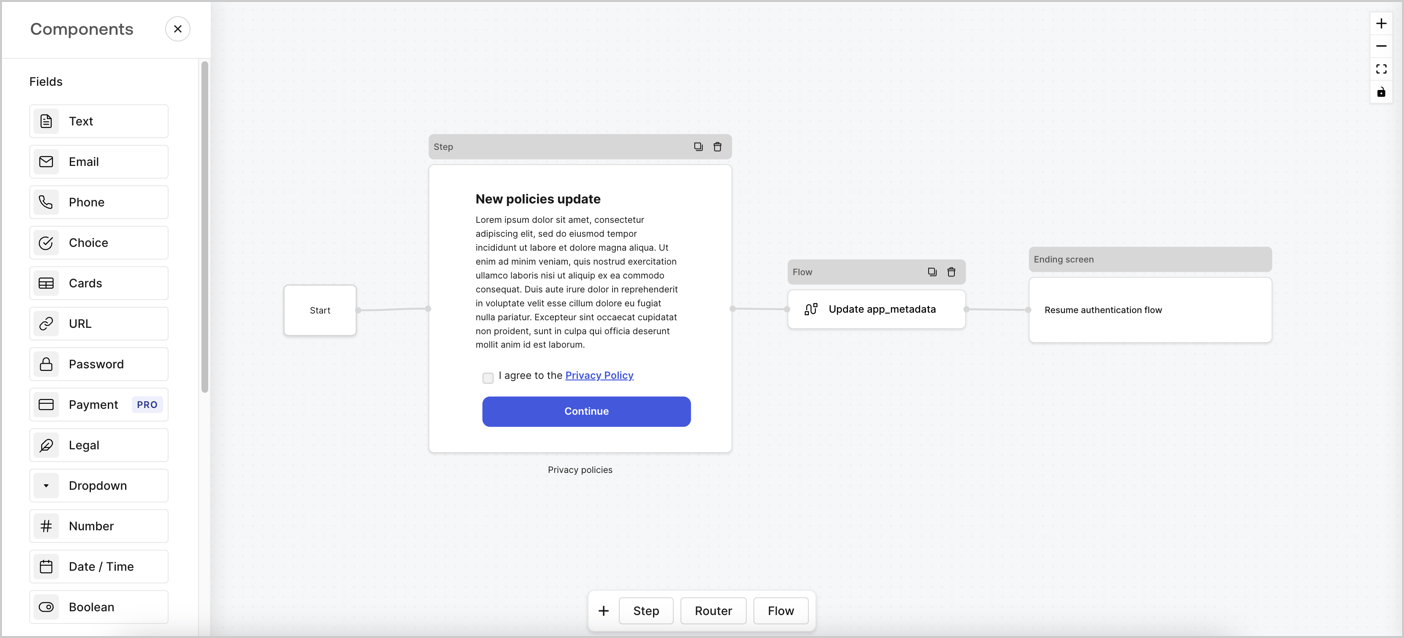
Forms for Actions allows you to create custom privacy policies flows and store the consent under the `app_metadata` object.
<Frame>
  <img src="https://mintcdn.com/docs-dev-fix-supported-algorithms/Kge9RX62XFgFaHKk/docs/images/cdy7uua7fh8z/6i68dMvHDTijfRmSgN1x8Q/ad900e7d4c0fb34645921435472b8684/privavy-policy-form.png?fit=max&auto=format&n=Kge9RX62XFgFaHKk&q=85&s=f5034259ca4911f51dd02d15df67c0fe" alt="Dashboard > Actions > Forms > Privacy policy use case" data-og-width="1404" width="1404" data-og-height="638" height="638" data-path="docs/images/cdy7uua7fh8z/6i68dMvHDTijfRmSgN1x8Q/ad900e7d4c0fb34645921435472b8684/privavy-policy-form.png" data-optimize="true" data-opv="3" srcset="https://mintcdn.com/docs-dev-fix-supported-algorithms/Kge9RX62XFgFaHKk/docs/images/cdy7uua7fh8z/6i68dMvHDTijfRmSgN1x8Q/ad900e7d4c0fb34645921435472b8684/privavy-policy-form.png?w=280&fit=max&auto=format&n=Kge9RX62XFgFaHKk&q=85&s=342b5360291fdf8832ebdaf0d6c5346b 280w, https://mintcdn.com/docs-dev-fix-supported-algorithms/Kge9RX62XFgFaHKk/docs/images/cdy7uua7fh8z/6i68dMvHDTijfRmSgN1x8Q/ad900e7d4c0fb34645921435472b8684/privavy-policy-form.png?w=560&fit=max&auto=format&n=Kge9RX62XFgFaHKk&q=85&s=7e1bebcc102f801b45ba5d2cfe41f664 560w, https://mintcdn.com/docs-dev-fix-supported-algorithms/Kge9RX62XFgFaHKk/docs/images/cdy7uua7fh8z/6i68dMvHDTijfRmSgN1x8Q/ad900e7d4c0fb34645921435472b8684/privavy-policy-form.png?w=840&fit=max&auto=format&n=Kge9RX62XFgFaHKk&q=85&s=041a45e6be40092b73e34b487fd91c9a 840w, https://mintcdn.com/docs-dev-fix-supported-algorithms/Kge9RX62XFgFaHKk/docs/images/cdy7uua7fh8z/6i68dMvHDTijfRmSgN1x8Q/ad900e7d4c0fb34645921435472b8684/privavy-policy-form.png?w=1100&fit=max&auto=format&n=Kge9RX62XFgFaHKk&q=85&s=341478f3c6f7c3599c6a13771b2af62c 1100w, https://mintcdn.com/docs-dev-fix-supported-algorithms/Kge9RX62XFgFaHKk/docs/images/cdy7uua7fh8z/6i68dMvHDTijfRmSgN1x8Q/ad900e7d4c0fb34645921435472b8684/privavy-policy-form.png?w=1650&fit=max&auto=format&n=Kge9RX62XFgFaHKk&q=85&s=45e2a8f3d64fcd9931077dda11aaafb1 1650w, https://mintcdn.com/docs-dev-fix-supported-algorithms/Kge9RX62XFgFaHKk/docs/images/cdy7uua7fh8z/6i68dMvHDTijfRmSgN1x8Q/ad900e7d4c0fb34645921435472b8684/privavy-policy-form.png?w=2500&fit=max&auto=format&n=Kge9RX62XFgFaHKk&q=85&s=53cc73f0e11dd5ac271ea273ab61c630 2500w" />
</Frame>

The sections below outline how you can create an Update Policy form using nodes and flows, along with steps for adding your form to a [Post Login](/docs/customize/actions/explore-triggers/signup-and-login-triggers/login-trigger) Action.

## Create a form from scratch

Follow these steps to create a form to gather information:

1. Open the Form editor by selecting **Auth0 Dashboard > Actions > Forms.**
2. Select **Create Form** > **Start from scratch**.

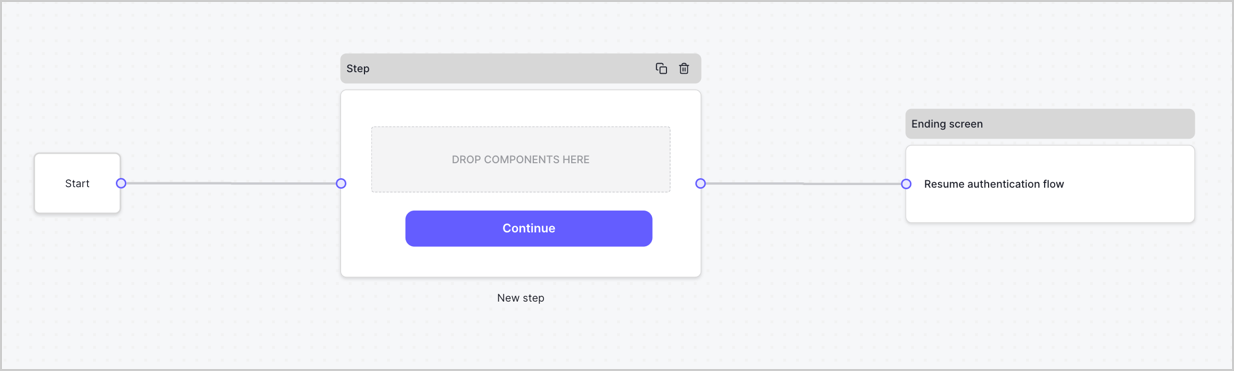
By default, a new form contains a Start node, a Step node, and an Ending screen node.
<Frame>
  <img src="https://mintcdn.com/docs-dev-fix-supported-algorithms/sHj-UBRKfmushZU6/docs/images/cdy7uua7fh8z/2TZ9jSjgEcARFpULI6hz4R/a4319a1bd482f2ee5cc23100fdb2f42c/New-form-Forms-for-action-use-case.png?fit=max&auto=format&n=sHj-UBRKfmushZU6&q=85&s=b6282b34ceefe1debf070c089d1c40a4" alt="Dashboard > Forms > Use Cases > Form" data-og-width="1234" width="1234" data-og-height="371" height="371" data-path="docs/images/cdy7uua7fh8z/2TZ9jSjgEcARFpULI6hz4R/a4319a1bd482f2ee5cc23100fdb2f42c/New-form-Forms-for-action-use-case.png" data-optimize="true" data-opv="3" srcset="https://mintcdn.com/docs-dev-fix-supported-algorithms/sHj-UBRKfmushZU6/docs/images/cdy7uua7fh8z/2TZ9jSjgEcARFpULI6hz4R/a4319a1bd482f2ee5cc23100fdb2f42c/New-form-Forms-for-action-use-case.png?w=280&fit=max&auto=format&n=sHj-UBRKfmushZU6&q=85&s=9b131cd37079116599116f95e7235138 280w, https://mintcdn.com/docs-dev-fix-supported-algorithms/sHj-UBRKfmushZU6/docs/images/cdy7uua7fh8z/2TZ9jSjgEcARFpULI6hz4R/a4319a1bd482f2ee5cc23100fdb2f42c/New-form-Forms-for-action-use-case.png?w=560&fit=max&auto=format&n=sHj-UBRKfmushZU6&q=85&s=dc918441176be2d631d78dd78ea9e96e 560w, https://mintcdn.com/docs-dev-fix-supported-algorithms/sHj-UBRKfmushZU6/docs/images/cdy7uua7fh8z/2TZ9jSjgEcARFpULI6hz4R/a4319a1bd482f2ee5cc23100fdb2f42c/New-form-Forms-for-action-use-case.png?w=840&fit=max&auto=format&n=sHj-UBRKfmushZU6&q=85&s=88036e088bf9186da4477b8ca8ac94c7 840w, https://mintcdn.com/docs-dev-fix-supported-algorithms/sHj-UBRKfmushZU6/docs/images/cdy7uua7fh8z/2TZ9jSjgEcARFpULI6hz4R/a4319a1bd482f2ee5cc23100fdb2f42c/New-form-Forms-for-action-use-case.png?w=1100&fit=max&auto=format&n=sHj-UBRKfmushZU6&q=85&s=e14d01c5d5b3808940dd7b351c215bfb 1100w, https://mintcdn.com/docs-dev-fix-supported-algorithms/sHj-UBRKfmushZU6/docs/images/cdy7uua7fh8z/2TZ9jSjgEcARFpULI6hz4R/a4319a1bd482f2ee5cc23100fdb2f42c/New-form-Forms-for-action-use-case.png?w=1650&fit=max&auto=format&n=sHj-UBRKfmushZU6&q=85&s=493b5981603db064a1b905230770a30a 1650w, https://mintcdn.com/docs-dev-fix-supported-algorithms/sHj-UBRKfmushZU6/docs/images/cdy7uua7fh8z/2TZ9jSjgEcARFpULI6hz4R/a4319a1bd482f2ee5cc23100fdb2f42c/New-form-Forms-for-action-use-case.png?w=2500&fit=max&auto=format&n=sHj-UBRKfmushZU6&q=85&s=75afb21cce51e6e8529c8a1f24ba828e 2500w" />
</Frame>

### Configure the Step node

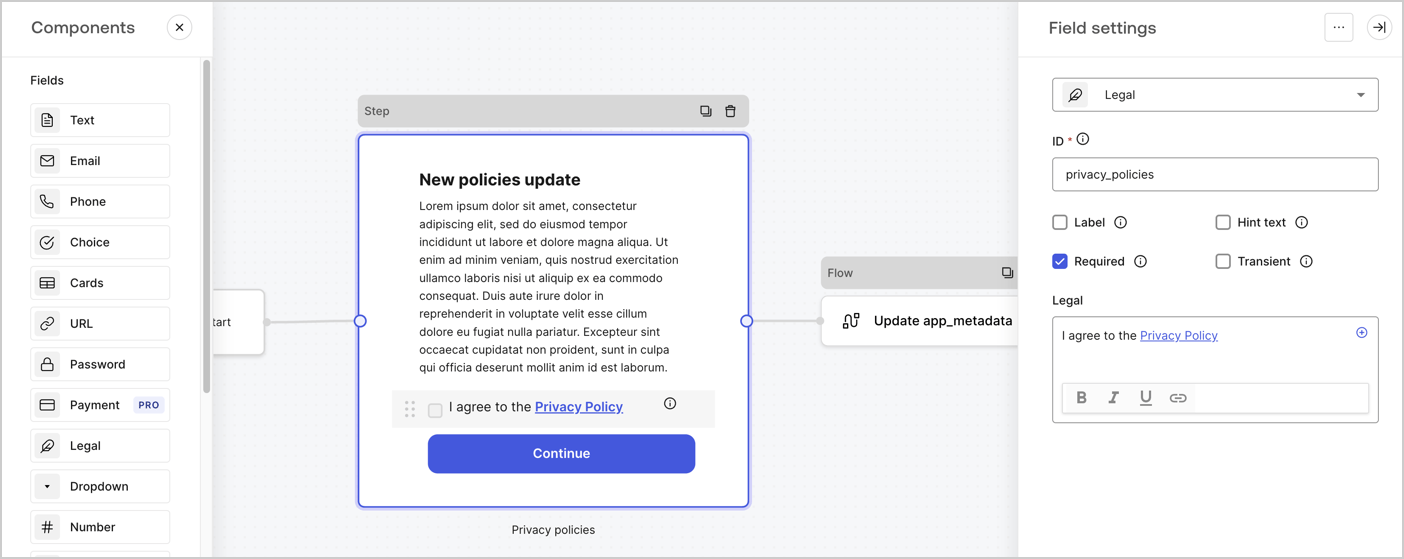
The Step node is the graphical interface visible to users. Add [Fields](/docs/customize/forms/nodes-and-components) to the Step node to collect the new agreement acceptance value by following these steps:

1. Drag a **Rich text** field from the **Components menu** into the **Step** node.

   * **Rich text**: Enter a description of your privacy policies updates.
   * Select **Save**.
2. Drag a **Legal** field into the **Step** node.

   * **ID**: Enter `privacy_policies`.
   * **Required**: Enable the checkbox.
   * **Legal**: Enter `I agree to the Privacy Policy`.
   * Select **Save**.
3. Select **Publish** to save.
<Frame>
  <img src="https://mintcdn.com/docs-dev-fix-supported-algorithms/9zdmvqJV2z_UfIGy/docs/images/cdy7uua7fh8z/59zFFjQjAnjogkc2QGIqqJ/0ad66b1b636544122aa4e65968b76c2c/privacy-policy-step-node.png?fit=max&auto=format&n=9zdmvqJV2z_UfIGy&q=85&s=ddbba5a61e50e4a896b5ac460809d58f" alt="Dashboard > Actions > Forms > Use case privacy policy step node" data-og-width="1404" width="1404" data-og-height="559" height="559" data-path="docs/images/cdy7uua7fh8z/59zFFjQjAnjogkc2QGIqqJ/0ad66b1b636544122aa4e65968b76c2c/privacy-policy-step-node.png" data-optimize="true" data-opv="3" srcset="https://mintcdn.com/docs-dev-fix-supported-algorithms/9zdmvqJV2z_UfIGy/docs/images/cdy7uua7fh8z/59zFFjQjAnjogkc2QGIqqJ/0ad66b1b636544122aa4e65968b76c2c/privacy-policy-step-node.png?w=280&fit=max&auto=format&n=9zdmvqJV2z_UfIGy&q=85&s=527579cc0131d0c25b0feaaf1d2f1599 280w, https://mintcdn.com/docs-dev-fix-supported-algorithms/9zdmvqJV2z_UfIGy/docs/images/cdy7uua7fh8z/59zFFjQjAnjogkc2QGIqqJ/0ad66b1b636544122aa4e65968b76c2c/privacy-policy-step-node.png?w=560&fit=max&auto=format&n=9zdmvqJV2z_UfIGy&q=85&s=4c1af4f80014e766f53f730765261a7f 560w, https://mintcdn.com/docs-dev-fix-supported-algorithms/9zdmvqJV2z_UfIGy/docs/images/cdy7uua7fh8z/59zFFjQjAnjogkc2QGIqqJ/0ad66b1b636544122aa4e65968b76c2c/privacy-policy-step-node.png?w=840&fit=max&auto=format&n=9zdmvqJV2z_UfIGy&q=85&s=71daeeab2a557c6d9a458bc151a37bec 840w, https://mintcdn.com/docs-dev-fix-supported-algorithms/9zdmvqJV2z_UfIGy/docs/images/cdy7uua7fh8z/59zFFjQjAnjogkc2QGIqqJ/0ad66b1b636544122aa4e65968b76c2c/privacy-policy-step-node.png?w=1100&fit=max&auto=format&n=9zdmvqJV2z_UfIGy&q=85&s=1e0cb8ce70a1772cf9701fccb460cba8 1100w, https://mintcdn.com/docs-dev-fix-supported-algorithms/9zdmvqJV2z_UfIGy/docs/images/cdy7uua7fh8z/59zFFjQjAnjogkc2QGIqqJ/0ad66b1b636544122aa4e65968b76c2c/privacy-policy-step-node.png?w=1650&fit=max&auto=format&n=9zdmvqJV2z_UfIGy&q=85&s=adc09e63cf188197e3f141a857ca9e16 1650w, https://mintcdn.com/docs-dev-fix-supported-algorithms/9zdmvqJV2z_UfIGy/docs/images/cdy7uua7fh8z/59zFFjQjAnjogkc2QGIqqJ/0ad66b1b636544122aa4e65968b76c2c/privacy-policy-step-node.png?w=2500&fit=max&auto=format&n=9zdmvqJV2z_UfIGy&q=85&s=0a32bacf3a9513502fbb64bb2b063d59 2500w" />
</Frame>

### Configure the Flow node

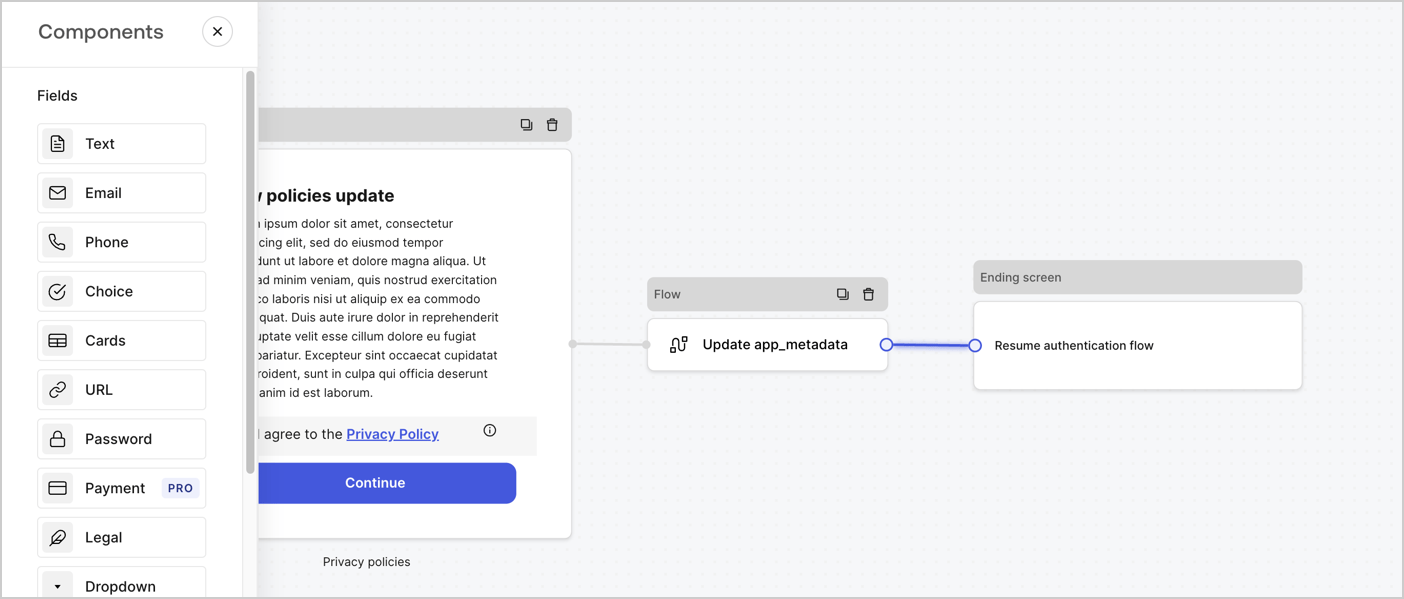
Add a **Flow** node after the **Step** node to update the `app_metadata` and resume the authentication flow by following these steps:

1. Select **Flow** from the bottom of the Form editor.
2. Remove the existing link between the **Step** and **Ending Screen** nodes.
3. Select the new **Flow** > **Click to add a flow** > **Create a new flow.**

   * Enter `Update app_metadata` in the **Name** field.
   * Select **Create**.
   * Select **Save**.
4. Link the **Flow** node to the **Step** and **Ending Screen** nodes as pictured below.
5. Select **Publish** to save.
<Frame>
  <img src="https://mintcdn.com/docs-dev-fix-supported-algorithms/Kge9RX62XFgFaHKk/docs/images/cdy7uua7fh8z/6YIkzm7SrpM9LW76AXuRzh/353c518fe82bbaa440836da1d83596d6/link-policies.png?fit=max&auto=format&n=Kge9RX62XFgFaHKk&q=85&s=4e9281bfde9c55a1ccc4a1c43b27b238" alt="Dashboard > Actions > Forms > Form" data-og-width="1404" width="1404" data-og-height="599" height="599" data-path="docs/images/cdy7uua7fh8z/6YIkzm7SrpM9LW76AXuRzh/353c518fe82bbaa440836da1d83596d6/link-policies.png" data-optimize="true" data-opv="3" srcset="https://mintcdn.com/docs-dev-fix-supported-algorithms/Kge9RX62XFgFaHKk/docs/images/cdy7uua7fh8z/6YIkzm7SrpM9LW76AXuRzh/353c518fe82bbaa440836da1d83596d6/link-policies.png?w=280&fit=max&auto=format&n=Kge9RX62XFgFaHKk&q=85&s=d892ffdc33d9edd85ea449ed6bf3aae9 280w, https://mintcdn.com/docs-dev-fix-supported-algorithms/Kge9RX62XFgFaHKk/docs/images/cdy7uua7fh8z/6YIkzm7SrpM9LW76AXuRzh/353c518fe82bbaa440836da1d83596d6/link-policies.png?w=560&fit=max&auto=format&n=Kge9RX62XFgFaHKk&q=85&s=834cb019a88791b6babf8f4fbfc44b00 560w, https://mintcdn.com/docs-dev-fix-supported-algorithms/Kge9RX62XFgFaHKk/docs/images/cdy7uua7fh8z/6YIkzm7SrpM9LW76AXuRzh/353c518fe82bbaa440836da1d83596d6/link-policies.png?w=840&fit=max&auto=format&n=Kge9RX62XFgFaHKk&q=85&s=32a16cd3d0d684f6400bdf74102c6044 840w, https://mintcdn.com/docs-dev-fix-supported-algorithms/Kge9RX62XFgFaHKk/docs/images/cdy7uua7fh8z/6YIkzm7SrpM9LW76AXuRzh/353c518fe82bbaa440836da1d83596d6/link-policies.png?w=1100&fit=max&auto=format&n=Kge9RX62XFgFaHKk&q=85&s=4375632e6eaa3fa697cf74ccc296f135 1100w, https://mintcdn.com/docs-dev-fix-supported-algorithms/Kge9RX62XFgFaHKk/docs/images/cdy7uua7fh8z/6YIkzm7SrpM9LW76AXuRzh/353c518fe82bbaa440836da1d83596d6/link-policies.png?w=1650&fit=max&auto=format&n=Kge9RX62XFgFaHKk&q=85&s=99be8aa9b8f3f6056fb7c66b191bc3af 1650w, https://mintcdn.com/docs-dev-fix-supported-algorithms/Kge9RX62XFgFaHKk/docs/images/cdy7uua7fh8z/6YIkzm7SrpM9LW76AXuRzh/353c518fe82bbaa440836da1d83596d6/link-policies.png?w=2500&fit=max&auto=format&n=Kge9RX62XFgFaHKk&q=85&s=46f9b5d0fd91962890b7decd6f3559f1 2500w" />
</Frame>

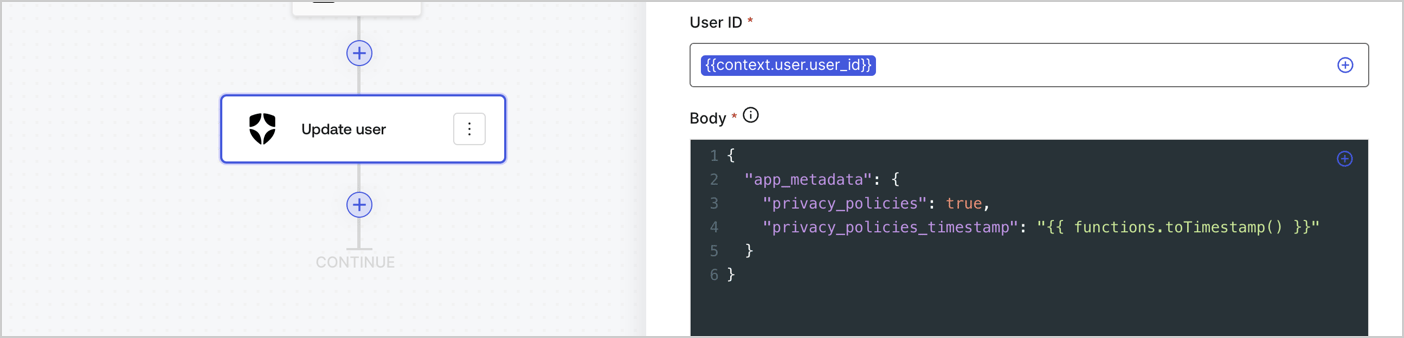
Add an Auth0 Update user action to the flow by following these steps:

1. Select the **Flow** **Update app\_metadata** > **Edit flow** to open the Flow editor in a new tab.
2. Below the StartAction, select the **+** icon to add an **Update user** action. Complete the fields below, then select **Save** to continue.

   * **Connection**: Select from the dropdown the Vault connection to your M2M application.

   * **User ID**: Enter `{{context.user.user_id}}`.

   * **Body**: Copy and paste the following code to update the app\_metadata with the privacy\_policies and privacy\_policies\_timestamp properties.

     ```text lines theme={null}
     {
       "app_metadata": {
         "privacy_policies": true,
         "privacy_policies_timestamp": "{{ functions.toTimestamp() }}"
       }
     }
     ```

   * Select **Save**.
3. Select **Publish** to save.
<Frame>
  <img src="https://mintcdn.com/docs-dev-fix-supported-algorithms/cnwfKXGo5drjrp4O/docs/images/cdy7uua7fh8z/CvMNIwWrOUwaFW4X3G28p/1fb70ae57a20749d9ffaaba8dc0b7e26/update-user-privacy.png?fit=max&auto=format&n=cnwfKXGo5drjrp4O&q=85&s=4bae02650fe7f3cf2641ed83ddccd81f" alt="Dashboard > Actions > Forms > User case privacy policy code" data-og-width="1404" width="1404" data-og-height="338" height="338" data-path="docs/images/cdy7uua7fh8z/CvMNIwWrOUwaFW4X3G28p/1fb70ae57a20749d9ffaaba8dc0b7e26/update-user-privacy.png" data-optimize="true" data-opv="3" srcset="https://mintcdn.com/docs-dev-fix-supported-algorithms/cnwfKXGo5drjrp4O/docs/images/cdy7uua7fh8z/CvMNIwWrOUwaFW4X3G28p/1fb70ae57a20749d9ffaaba8dc0b7e26/update-user-privacy.png?w=280&fit=max&auto=format&n=cnwfKXGo5drjrp4O&q=85&s=406e5db258fb4acf9b001cd97ca9b8e0 280w, https://mintcdn.com/docs-dev-fix-supported-algorithms/cnwfKXGo5drjrp4O/docs/images/cdy7uua7fh8z/CvMNIwWrOUwaFW4X3G28p/1fb70ae57a20749d9ffaaba8dc0b7e26/update-user-privacy.png?w=560&fit=max&auto=format&n=cnwfKXGo5drjrp4O&q=85&s=efb7307b3d4518e80d6bca32dff1b265 560w, https://mintcdn.com/docs-dev-fix-supported-algorithms/cnwfKXGo5drjrp4O/docs/images/cdy7uua7fh8z/CvMNIwWrOUwaFW4X3G28p/1fb70ae57a20749d9ffaaba8dc0b7e26/update-user-privacy.png?w=840&fit=max&auto=format&n=cnwfKXGo5drjrp4O&q=85&s=42605a46730c4c6359379ffad7530486 840w, https://mintcdn.com/docs-dev-fix-supported-algorithms/cnwfKXGo5drjrp4O/docs/images/cdy7uua7fh8z/CvMNIwWrOUwaFW4X3G28p/1fb70ae57a20749d9ffaaba8dc0b7e26/update-user-privacy.png?w=1100&fit=max&auto=format&n=cnwfKXGo5drjrp4O&q=85&s=ff4201c75dbbc53ea95a5021cbdbf394 1100w, https://mintcdn.com/docs-dev-fix-supported-algorithms/cnwfKXGo5drjrp4O/docs/images/cdy7uua7fh8z/CvMNIwWrOUwaFW4X3G28p/1fb70ae57a20749d9ffaaba8dc0b7e26/update-user-privacy.png?w=1650&fit=max&auto=format&n=cnwfKXGo5drjrp4O&q=85&s=937c71f4759c8593aa8de6baad298c90 1650w, https://mintcdn.com/docs-dev-fix-supported-algorithms/cnwfKXGo5drjrp4O/docs/images/cdy7uua7fh8z/CvMNIwWrOUwaFW4X3G28p/1fb70ae57a20749d9ffaaba8dc0b7e26/update-user-privacy.png?w=2500&fit=max&auto=format&n=cnwfKXGo5drjrp4O&q=85&s=a28edaf19734f384e2662991a8e5d418 2500w" />
</Frame>

<Callout icon="file-lines" color="#0EA5E9" iconType="regular">
  The flow **Update app\_metadata** adds a `privacy_policies true` value to the app`_metadata` object and also generates a timestamp with a [helper function.](/docs/customize/forms/variables)
</Callout>

## Retrieve the form render code

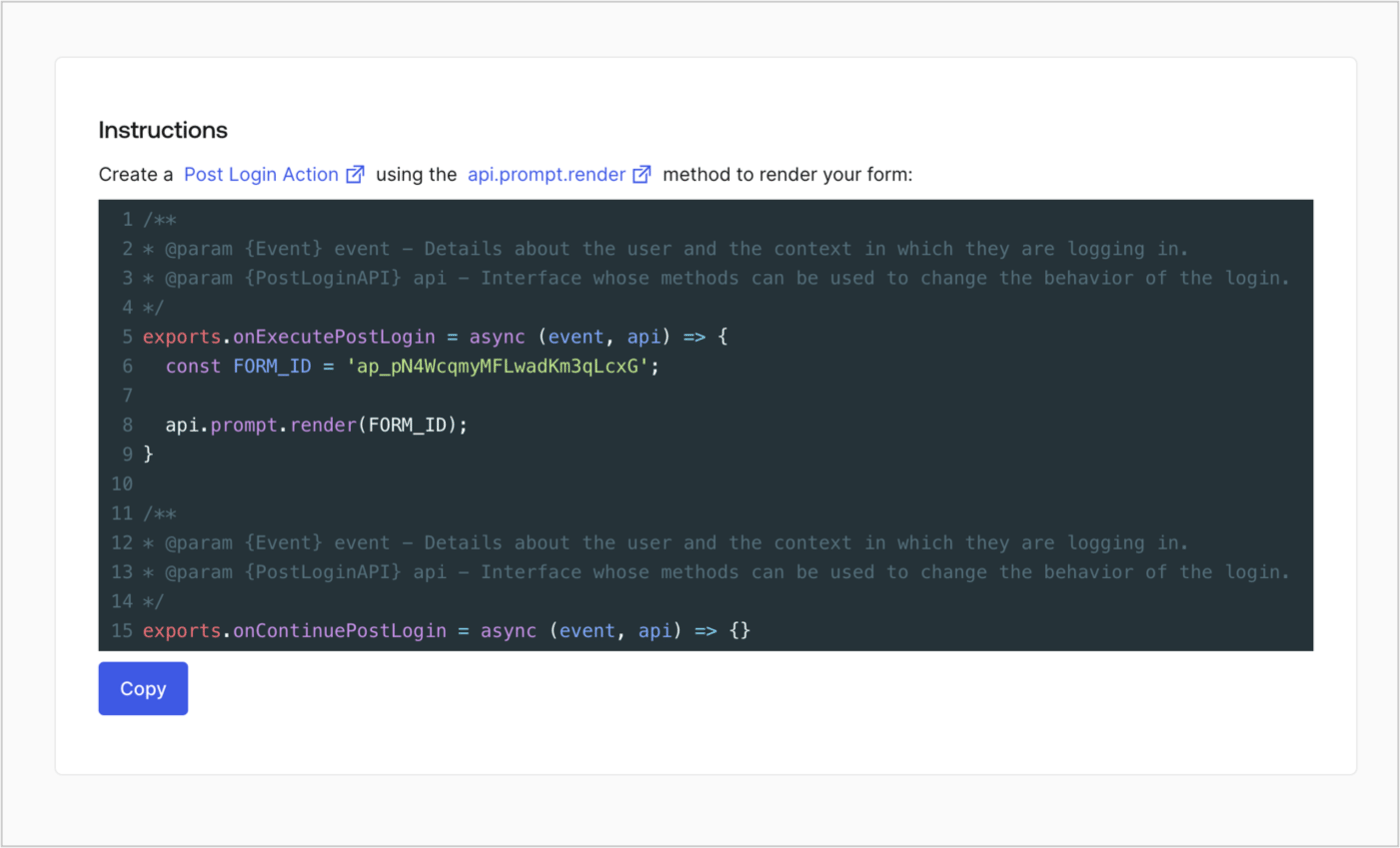
Retrieve your form render code to visually render the form with a custom Post Login Action by following these steps:

* From the Form editor, select **`<> Render`**.
* Select **Copy**.
<Frame>
  <img src="https://mintcdn.com/docs-dev-fix-supported-algorithms/d6xb9QIhEs5rU7G-/docs/images/cdy7uua7fh8z/2EIUzc539sq9lwoTKbjoJv/496a864c0fc44a782c9cadca119dbfb0/embed.png?fit=max&auto=format&n=d6xb9QIhEs5rU7G-&q=85&s=6b74310ad750553e5a81cc69495cdea7" alt="Dashboard > Actions > Forms > Form > Embed" data-og-width="1400" width="1400" data-og-height="848" height="848" data-path="docs/images/cdy7uua7fh8z/2EIUzc539sq9lwoTKbjoJv/496a864c0fc44a782c9cadca119dbfb0/embed.png" data-optimize="true" data-opv="3" srcset="https://mintcdn.com/docs-dev-fix-supported-algorithms/d6xb9QIhEs5rU7G-/docs/images/cdy7uua7fh8z/2EIUzc539sq9lwoTKbjoJv/496a864c0fc44a782c9cadca119dbfb0/embed.png?w=280&fit=max&auto=format&n=d6xb9QIhEs5rU7G-&q=85&s=d4ea39a57f0cec0e1c4dff0a7963a8a0 280w, https://mintcdn.com/docs-dev-fix-supported-algorithms/d6xb9QIhEs5rU7G-/docs/images/cdy7uua7fh8z/2EIUzc539sq9lwoTKbjoJv/496a864c0fc44a782c9cadca119dbfb0/embed.png?w=560&fit=max&auto=format&n=d6xb9QIhEs5rU7G-&q=85&s=4f2ad3fa2571089abc857eda25b296cc 560w, https://mintcdn.com/docs-dev-fix-supported-algorithms/d6xb9QIhEs5rU7G-/docs/images/cdy7uua7fh8z/2EIUzc539sq9lwoTKbjoJv/496a864c0fc44a782c9cadca119dbfb0/embed.png?w=840&fit=max&auto=format&n=d6xb9QIhEs5rU7G-&q=85&s=74abdd35e9c5d2176385eb547192bbd1 840w, https://mintcdn.com/docs-dev-fix-supported-algorithms/d6xb9QIhEs5rU7G-/docs/images/cdy7uua7fh8z/2EIUzc539sq9lwoTKbjoJv/496a864c0fc44a782c9cadca119dbfb0/embed.png?w=1100&fit=max&auto=format&n=d6xb9QIhEs5rU7G-&q=85&s=3802fede09a78b836cbfad43b5af733c 1100w, https://mintcdn.com/docs-dev-fix-supported-algorithms/d6xb9QIhEs5rU7G-/docs/images/cdy7uua7fh8z/2EIUzc539sq9lwoTKbjoJv/496a864c0fc44a782c9cadca119dbfb0/embed.png?w=1650&fit=max&auto=format&n=d6xb9QIhEs5rU7G-&q=85&s=f988e5c7ecc2c4350d29eec0637dfab4 1650w, https://mintcdn.com/docs-dev-fix-supported-algorithms/d6xb9QIhEs5rU7G-/docs/images/cdy7uua7fh8z/2EIUzc539sq9lwoTKbjoJv/496a864c0fc44a782c9cadca119dbfb0/embed.png?w=2500&fit=max&auto=format&n=d6xb9QIhEs5rU7G-&q=85&s=f63d2aa759d65441f3dd040b1fed037b 2500w" />
</Frame>

## Create a Post Login Action

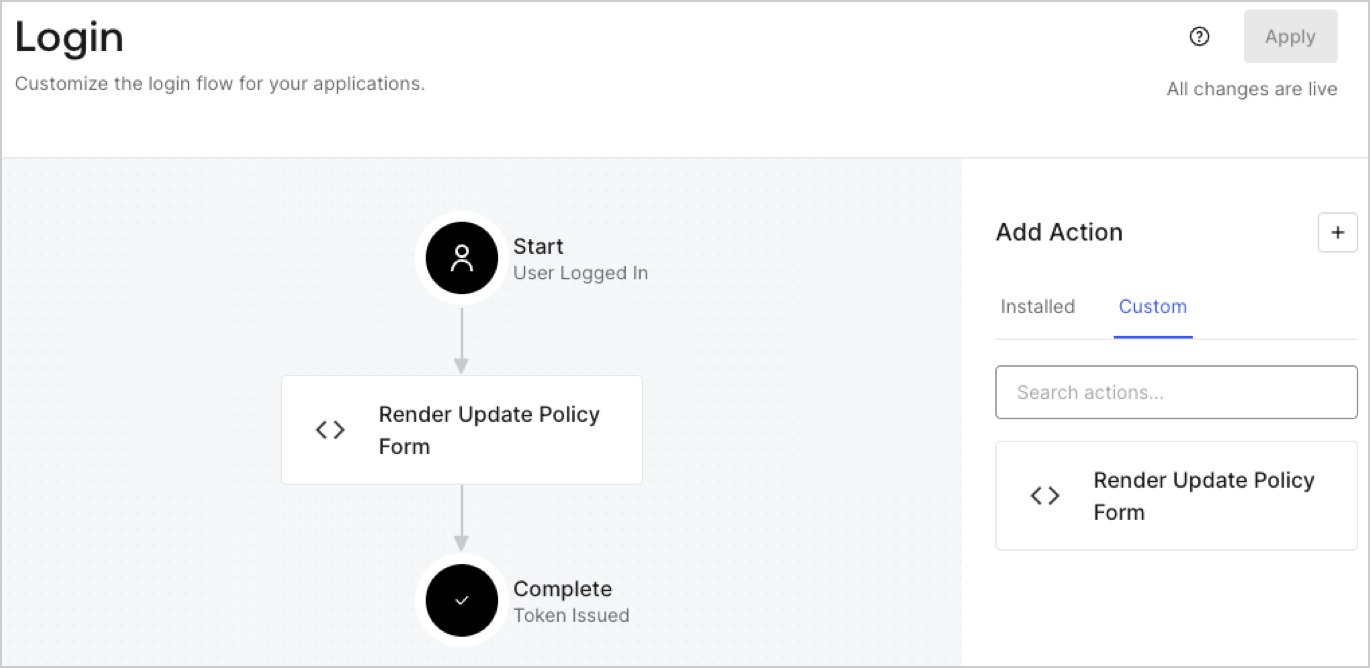
Create a post-login Action to render your form by following these steps:

1. Navigate to **Auth0 Dashboard > Actions > Flows > Login.**
2. Select the **+** icon and Select **Build from scratch**:

   * **Name**: Enter `Render Update Policy Form`.
   * **Trigger**: Select `Login / Post Login`.
   * **Runtime**: Select the recommended version.
3. Select **Create**.

To configure the post-login Action:

1. Delete the existing code from the Code editor.
2. Paste the form render code into the Code editor.
3. Edit the code to define the conditional logic that will render the form.

   ```javascript lines theme={null}
   /**
   * @param {Event} event - Details about the user and the context in which they are logging in.
   * @param {PostLoginAPI} api - Interface whose methods can be used to change the behavior of the login.
   */
   exports.onExecutePostLogin = async (event, api) => {
     const FORM_ID = 'REPLACE_WITH_YOUR_FORM_ID';

     if (event.user.app_metadata.privacy_policies !== true) {
       api.prompt.render(FORM_ID);
     }
   }

   exports.onContinuePostLogin = async (event, api) => { }
   ```

   <Callout icon="file-lines" color="#0EA5E9" iconType="regular">
     The example code above will render the form when a user is missing the app metadata `privacy_policies` property.
   </Callout>
4. Select **Deploy.**
5. Drag and Drop the **Render Update Policy Form** Action to the **Login** flow.
   <Frame>
     <img src="https://mintcdn.com/docs-dev-fix-supported-algorithms/JVBVSeyTYd6Ld4S6/docs/images/cdy7uua7fh8z/5TOwDgevZsBqd7yZynUYWU/41ca909dc3007aed4f40ff794a05efa5/postlogin.png?fit=max&auto=format&n=JVBVSeyTYd6Ld4S6&q=85&s=263172f6f5a03a872bc0a3ba83a95082" alt="Dashboard > Forms > Use Case > Render update policy form login action" data-og-width="1370" width="1370" data-og-height="668" height="668" data-path="docs/images/cdy7uua7fh8z/5TOwDgevZsBqd7yZynUYWU/41ca909dc3007aed4f40ff794a05efa5/postlogin.png" data-optimize="true" data-opv="3" srcset="https://mintcdn.com/docs-dev-fix-supported-algorithms/JVBVSeyTYd6Ld4S6/docs/images/cdy7uua7fh8z/5TOwDgevZsBqd7yZynUYWU/41ca909dc3007aed4f40ff794a05efa5/postlogin.png?w=280&fit=max&auto=format&n=JVBVSeyTYd6Ld4S6&q=85&s=7e1dc471f16b9031e0c1629acbe66ee9 280w, https://mintcdn.com/docs-dev-fix-supported-algorithms/JVBVSeyTYd6Ld4S6/docs/images/cdy7uua7fh8z/5TOwDgevZsBqd7yZynUYWU/41ca909dc3007aed4f40ff794a05efa5/postlogin.png?w=560&fit=max&auto=format&n=JVBVSeyTYd6Ld4S6&q=85&s=a6f360ffd98fd53c190636a0b10ff7e9 560w, https://mintcdn.com/docs-dev-fix-supported-algorithms/JVBVSeyTYd6Ld4S6/docs/images/cdy7uua7fh8z/5TOwDgevZsBqd7yZynUYWU/41ca909dc3007aed4f40ff794a05efa5/postlogin.png?w=840&fit=max&auto=format&n=JVBVSeyTYd6Ld4S6&q=85&s=88ff0d66f0ae790e7087ef7bc9eb4cca 840w, https://mintcdn.com/docs-dev-fix-supported-algorithms/JVBVSeyTYd6Ld4S6/docs/images/cdy7uua7fh8z/5TOwDgevZsBqd7yZynUYWU/41ca909dc3007aed4f40ff794a05efa5/postlogin.png?w=1100&fit=max&auto=format&n=JVBVSeyTYd6Ld4S6&q=85&s=e6b8cf61529a0f2272bb55dc11d279fb 1100w, https://mintcdn.com/docs-dev-fix-supported-algorithms/JVBVSeyTYd6Ld4S6/docs/images/cdy7uua7fh8z/5TOwDgevZsBqd7yZynUYWU/41ca909dc3007aed4f40ff794a05efa5/postlogin.png?w=1650&fit=max&auto=format&n=JVBVSeyTYd6Ld4S6&q=85&s=96fec00e3db5586fe55cfdaa48154de9 1650w, https://mintcdn.com/docs-dev-fix-supported-algorithms/JVBVSeyTYd6Ld4S6/docs/images/cdy7uua7fh8z/5TOwDgevZsBqd7yZynUYWU/41ca909dc3007aed4f40ff794a05efa5/postlogin.png?w=2500&fit=max&auto=format&n=JVBVSeyTYd6Ld4S6&q=85&s=89011400b4bada6e1c7ec3b99fd2328e 2500w" />
   </Frame>
6. Select **Apply.**

### Test implementation

Test the implementation by following these steps:

1. Log in with an existing user whose app`_metadata` attribute `privacy_policies` does not have a value.
2. The post-login Action in the Login flow will render the form and prompt for acceptance.
3. Select **Auth0 Dashboard > User Management > Users,** locate the user and verify that the `app_metadata` attribute `privacy_policies` contains a `true` value and a timestamp.
